
Last updated: September 2026. This guide is based on user reports and public information. Always verify current requirements on the government portal.
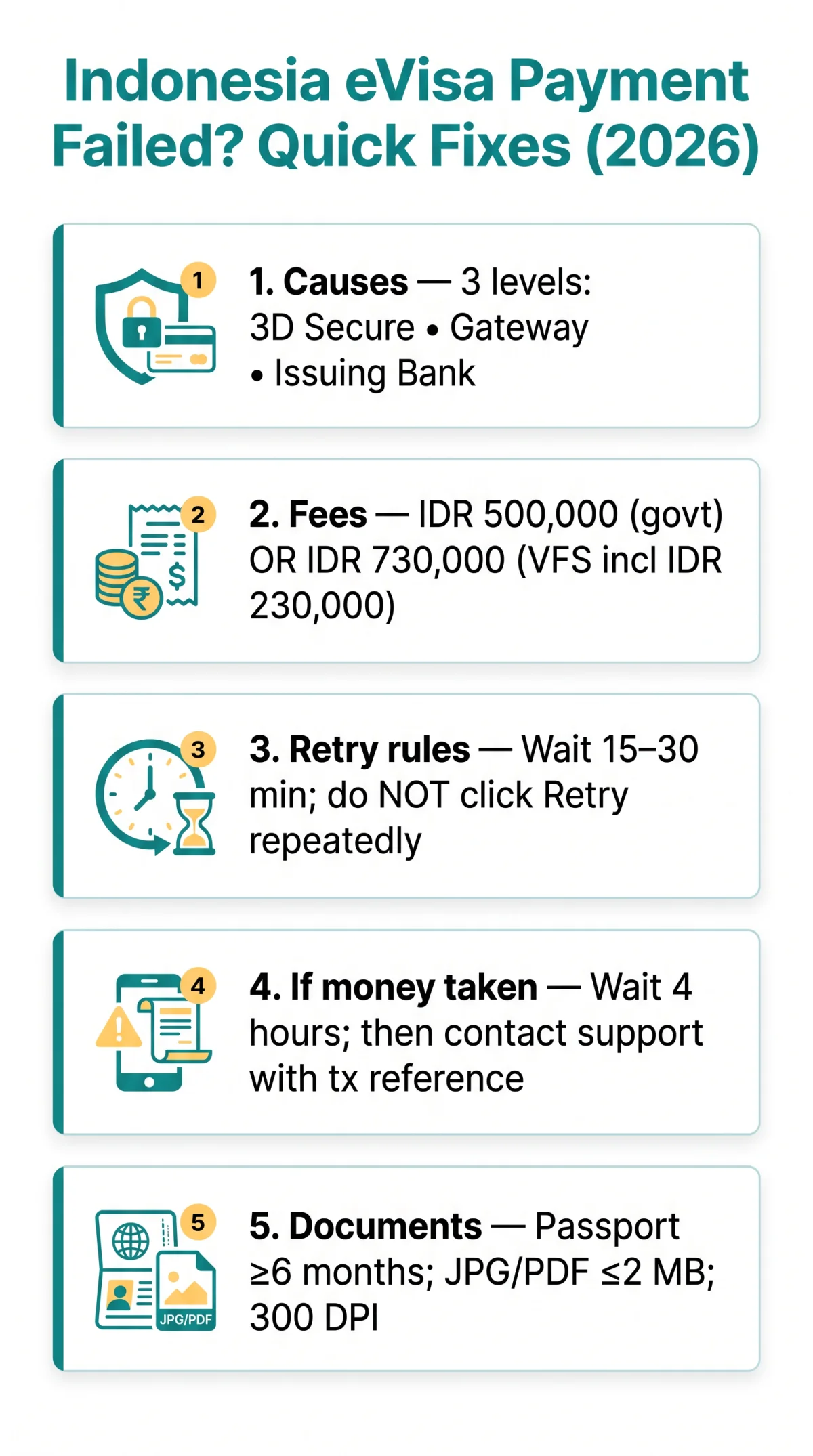
Indonesia eVisa payment failures most commonly result from UK bank international transaction blocks or failed 3D Secure verification. Disable VPN, clear your browser cache, enable international payments with your bank, and retry after 15-30 minutes. If funds were deducted without confirmation, wait 4 hours before contacting support with your transaction reference.
When an Indonesia eVisa payment failed error appears, the issue typically occurs at three levels: card authentication, payment gateway processing, or issuing bank rejection. The eVisa portal managed by the Directorate General of Immigration accepts international Visa, Mastercard, or JCB debit and credit cards with active 3D Secure. Cards without this authentication are rejected.
Why Does the Indonesia eVisa Payment Fail? Main Causes and Step-by-Step Fix
Indonesia eVisa payments fail at three levels: card authentication, payment gateway processing, or issuing bank rejection of international transactions. Your passport must be valid for at least 6 months from your arrival date to avoid application-level blocks before checkout.
| Supported Cards | Unsupported Cards |
|---|---|
| Visa, Mastercard, JCB debit/credit with 3D Secure active | American Express, non-3D Secure cards, some prepaid cards |
Verify card details
Check card number, expiry date, CVV, and billing address.
Check for 3D Secure OTP
Look for the OTP via SMS, your banking app, or spam folder.
Confirm sufficient funds
Ensure your card covers the government fee of IDR 500,000 or the VFS platform total of IDR 730,000 (including a IDR 230,000 service fee).
Wait before retrying
Wait 15 to 30 minutes before retrying to avoid a payment window expired error.
Retry the payment
Retry on evisa.imigrasi.go.id or indonesiavoa.vfsevisa.id depending on where you applied.
Try an alternative card
If the transaction still fails, use a different card.
Do NOT click “Retry” multiple times in quick succession, as this risks duplicate charges or account lockout. Once payment succeeds, the e-VoA processing time is 24 hours.
UK Bank Cards and Indonesia eVisa Payments: What You Need to Know
UK banks including HSBC, Barclays, and Lloyds frequently block Indonesia eVisa payments; contact your bank to enable international transactions before applying. UK issuers flag Indonesian payment gateways due to high-risk merchant category codes and cross-border fraud patterns.
| UK Bank | How to Enable International Payments | Notes |
|---|---|---|
| Barclays | Phone call or app | May require daily limit increase |
| HSBC | Phone call or app | May require daily limit increase |
| Lloyds | Phone call | May require daily limit increase |
| NatWest | App or phone | Check daily transaction limit |
| Monzo | In-app toggle | Manual enable required |
| Revolut | In-app toggle | Manual enable required |
| Starling | In-app toggle | Manual enable required |
Barclays, HSBC, and Lloyds frequently block Indonesian gateways. Before applying for your Indonesia eVisa, complete this checklist: (1) enable international payments with your bank; (2) raise your daily transaction limit if needed; (3) confirm 3D Secure is active on the card; (4) have a backup card from a different bank ready. The cardholder name does not need to match the applicant name (source: VFS Global FAQ).
Payment Page Frozen, Browser Fixes, and Account Lockout Recovery
The Indonesia eVisa payment session times out after 15-30 minutes, freezing the billing code screen; accounts lock after multiple failed attempts. Clear your cache, reset your password, and wait for the cooldown period.
Payment Page Frozen and Browser Fixes
The “Please wait for billing code created” loop appears during session timeouts, slow card verification, or tab switching. White screens stem from browser cache conflicts, ad-blocker interference, and VPN routing. A 500 Internal Server Error on the Indonesia eVisa portal indicates a temporary gateway outage; wait and retry later.
Clear cache: Chrome/Edge > Settings > Privacy > Clear browsing data > Cached images and files > Clear; Firefox > Settings > Privacy > Clear Data > Cached Web Content > Clear; Safari > Preferences > Privacy > Manage Website Data > Remove All.
Minimum browser configuration for the Indonesia eVisa portal: disable VPN/proxy, ad-blocker, and pop-up blocker. Enable JavaScript, try incognito mode, and use Chrome or Firefox for best compatibility.
Account Lockout Recovery
Indonesia eVisa accounts lock after 3-5 failed attempts. Cooldown period: 15-60 minutes.
- Stop login attempts and wait for the cooldown period.
- Click “Forgot Password” and check your email and spam folder.
- Create a new password.
- If the reset email does not arrive, contact support.
For CAPTCHA errors, switch browsers, disable VPN, and enable cookies. Contact support via VFS Live Chat at indonesiavoa.vfsevisa.id or the “Mido” virtual assistant at evisa.imigrasi.go.id.
Document Upload Errors and Funds Deducted Without Visa Confirmation
Indonesia eVisa document uploads accept JPG, JPEG, PNG, or PDF files under a 2 MB file size limit at 300 DPI minimum resolution. If funds were deducted without confirmation, wait 4 hours before contacting support with your transaction reference.
| Error Message | Fix |
|---|---|
| File format not supported | Convert to JPG or PDF |
| File too large | Compress image, maintain 300 DPI minimum |
| Upload button unresponsive | Disable pop-up blocker, try incognito mode, switch browser |
| Upload stalls silently | Disable VPN, check internet stability |
Required uploads: passport bio-page scan and return or onwards flight tickets. Each family member needs separate documents. A successful upload shows a green checkmark or “Uploaded” text.
If your Indonesia eVisa shows “Awaiting Payment” after funds left your account, this is a reconciliation delay between the payment gateway and the immigration system. Do NOT retry immediately.
Wait 1 hour
Check spam, log back in to check status
After 4 hours
Contact VFS Live Chat with transaction reference
After 24 hours
Initiate UK bank chargeback under Consumer Credit Act 1974 or Payment Services Regulations 2017
For duplicate charges, screenshot both transactions and contact support immediately. The government portal at evisa.imigrasi.go.id states: “We cannot refund payments for error in visa application.” Refunds apply only to confirmed technical glitches.
FAQ: Indonesia eVisa Payment Problems
Why did my Indonesia eVisa payment fail even though my card has sufficient funds?
Your bank likely blocked the international transaction or 3D Secure failed. Contact your bank to enable international payments before retrying.
Can I pay for my Indonesia eVisa using a card in another person’s name?
Yes, the cardholder name does not need to match the applicant. Ensure the billing address matches the card’s registered address. For more details on accepted cards and payment methods for the Indonesia eVisa, check our dedicated guide.
Will I get a refund if my Indonesia eVisa application is rejected?
No, the government portal states no refunds for application errors or rejections. Refunds apply only for confirmed technical glitches like duplicate charges.
How long does the Indonesia eVisa payment session last before it expires?
The Directorate General of Immigration does not publish the exact timeout; user reports suggest 15 to 30 minutes. Have card details ready.
Can I reapply immediately after a failed Indonesia eVisa payment?
Check your account status first. A failed payment may leave a pending record. If the application shows incomplete, you can start fresh.
Which UK banks commonly block Indonesia eVisa payments?
HSBC, Barclays, and Lloyds frequently flag Indonesian gateway transactions. Monzo and Revolut may require enabling international payments manually in-app.
Is it safe to use a VPN when paying for my Indonesia eVisa?
No, VPNs interfere with payment gateway security checks and cause transaction failures. Disable VPN and ad-blocker before making the payment.
What file format and size do I need for Indonesia eVisa passport upload?
JPG, JPEG, PNG, or PDF. Keep files under 2 MB and ensure at least 300 DPI for the passport biometric page for clear OCR processing.
What should I do if money was taken but I did not receive Indonesia eVisa confirmation?
Wait 1 hour, check spam, check portal status. After 4 hours, contact support with your transaction reference. After 24 hours, initiate a chargeback.
How do I clear my browser cache to fix Indonesia eVisa site errors?
Chrome: Settings > Privacy > Clear browsing data > Cached images and files. Safari: Preferences > Privacy > Manage Website Data > Remove All.